MS Project
Learn MS Project from basics to advanced features with guided, step-by-step lessons. Practice creating schedules, tracking tasks, and managing dependencies using real examples. Explore real-life scenarios from IT, construction, and business operations. Receive expert feedback and personal guidance. Resume and interview support tailored to project management roles.
Costs: $199.00
Course Overview
You'll learn to plan, track, and manage projects efficiently using industry-standard practices.
Course content includes real-world scenarios, guided exercises, and collaborative learning.
By the end, you’ll be confident using MS Project to manage timelines, resources, and budgets effectively.
This course is ideal for beginners and project professionals looking to sharpen their skills.
what you will learn
- Understand and navigate the Microsoft Project interface with confidence.
- Create, structure, and manage detailed project schedules from scratch.
- Define tasks, milestones, and dependencies effectively.
- Allocate and manage resources, budgets, and workloads efficiently.
- Build and analyze Gantt charts, critical paths, and baselines.
- Track project progress using earned value and variance analysis.
- Generate custom dashboards and reports for stakeholders.
- Manage multiple projects and resource pools.
- Use MS Project for Agile and Waterfall project environments.
- Integrate MS Project with Excel, Power BI, and SharePoint for enhanced reporting.
Next Cohort Starts In
Skilled Covererd
- Task Scheduling
- Resource Management
- Project Budgeting
- Timeline Tracking
- Gantt Chart Creation
- Critical Path Analysis
- Report Generation
- Project Monitoring & Control
- Dependency Management
Benefits
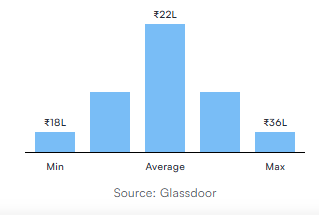
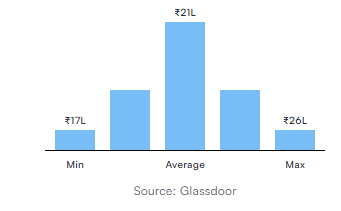
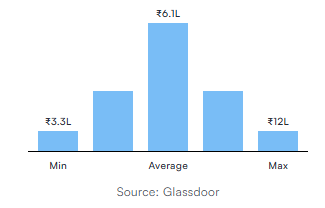
The certification can help you land lucrative roles in IT, manufacturing, finance, healthcare, and other exciting industries certified project managers drive better project performance and are often rewarded with substantial pay raises as shown below.
Designation
Annual Salary
Hiring Companies















Course Curriculum
Initial Settings
Week, Time Start, End
Project Start Date
Project Calendar
Save Project File
Show Project Summary Task
Planning – Activities
Manual & Auto Schedule Activity Modes
Add Tasks
Create WBS
WBS Outline
Cut, Copy, Paste Tasks
Split & Recurring Tasks
Milestones
Relationships, Lag, Leads
Deadline & Constraints
Change Timescale
Create Tables / Open a Table
Text Formatting
Insert / Hide Columns
Critical Tasks
Filter, Group, Sort
Highlight
Slack
Hyperlink
Notes
Planning – Resources
Add Resource
Set Currency Symbol
Define Resource Calendar
Resource Assignment
Resource Leveling
Using Task Type
Using Effort Driven
Execution & Monitoring
Create Baseline
Enter Progress
Monitor Work Progress with Baseline
Reports
Table Reports
Graphical Reports
Visual Reports
Others
Sub Projects
Export to Excel
Save as Template
Compare Projects
Custom Fields
MS Project FAQ
MS Project is a project management software that helps professionals plan, schedule, track, and manage resources and budgets efficiently.
Yes — the course starts from the basics and gradually moves into advanced features. No prior experience is needed.
You’ll learn to create Gantt charts, assign resources, manage budgets, track progress, and generate reports.
Absolutely — you’ll work on multiple case studies from IT, construction, and service-based projects.
Yes — 1-on-1 mentoring and discussion forums are available for queries and guidance.
Ideal for Project Managers, Coordinators, Business Analysts, Team Leads, and Planners in any domain.
Eligibility
- Learn how to plan, execute, and track projects effectively using Microsoft Project.
- Offer scheduling and project planning services using MS Project expertise.
- Build confidence by managing actual project plans from start to finish.
- Allocate resources effectively and monitor workload.
- Track budgets and costs throughout the project lifecycle.
- Use baseline tracking for performance measurement.
- Generate customized project reports for stakeholders.
Pre-requisites
- No prior MS Project experience required.
- Basic knowledge of project management principles is helpful (not mandatory).
- Familiarity with Windows and Microsoft Office tools (Excel, Word) recommended.
Contact Us
1800-212-7688
(Toll Free)
Costs: $199.00
- LevelBeginner
- Duration20 hours
Why join this program
Develop skills for real career growth
Cutting-edge curriculum designed in guidance with industry and academia to develop job-ready skills
Learn from experts active in their field, not out-of-touch trainers
Leading practitioners who bring current best practices and case studies to sessions that fit into your work schedule.
Learn by working on real-world problems
Capstone projects involving real world data sets with virtual labs for hands-on learning
Structured guidance ensuring learning never stops
24×7 Learning support from mentors and a community of like-minded peers to resolve any conceptual doubts