Azure Data Engineer
30+ Hours of Expert-Led Video Training8+ Core Azure Data Tools/Services Covered: Including Azure Data Factory, Data Lake Gen2, Synapse Analytics, Databricks, Stream Analytics, Cosmos DB, SQL Data Warehouse/SQL DB.Certification Preparation: Guidance to prepare for Azure Data Engineer Associate certificationCareer & Portfolio Support: Resume-building, mock interviews, portfolio guidance tailored to Azure Data Engineer roles.
Costs: $199.00
For corporate training and group discounts |

Course Overview
Master the fundamentals of Data Analysis
Learn data visualization tools and techniques to represent the data graphically
Guidance on most common mistakes to avoid when analyzing multiple datasets
Data analysis in the business environment
what you will learn
- Analytical and problem-solving skills to drive data driven decisions
- Procedures for data mapping, compliance and statement validation
- Ability to analyze and interpret data to provide actionable insights.
- Representation of data insights to non-technical stakeholders.
- Accuracy in data interpretation and reporting.
Next Cohort Starts In
Skilled Covererd
- Undertanding of tables, database and views
- Descriptive Statistics
- Data Visualization Techniques: Bar charts, histograms, stacked area charts, etc
- Pivot tables and pivot charts
Benefits
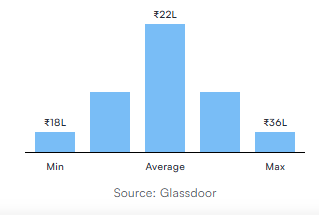
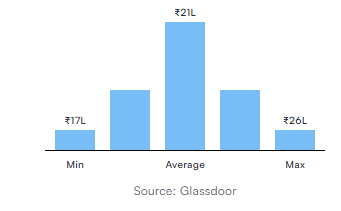
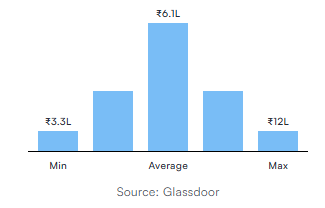
The certification can help you land lucrative roles in IT, manufacturing, finance, healthcare, and other exciting industries certified project managers drive better project performance and are often rewarded with substantial pay raises as shown below.
Designation
Annual Salary
Hiring Companies















Course Curriculum
Basics of Cloud Computing
What is Cloud Computing?
Types of Cloud Deployment Models (Private, Public, Hybrid)
Types of Cloud Services (IaaS, PaaS, SaaS)
Introduction to Big Data
What is Data?
What is Big Data?
Types of Data: Structured, Semi-Structured, Unstructured
Introduction to Azure
Create an Azure Account
Overview of Azure Portal
Subscription & Resource Group
Blob Storage, Data Lake Storage
Azure SQL Server & Database
Azure Data Factory
Azure Databricks
Azure Key Vaults
Azure Logic Apps
GitHub Repository
Data Lake Storage (ADLS)
Create a Storage Account
Types of Storage Accounts
Create an ADLS Account
Configure Access to ADLS
Load Data to ADLS
Read & Write Data to ADLS
Configure Backup & Disaster Recovery
Azure SQL
Create Azure SQL Server & Database
Configure Elastic Pools
Configure Compute Resources
Configure Access & Security
Configure Azure SQL Connection to Data Factory & Databricks
Azure Data Factory (ADF)
ADF UI Walkthrough
Components of ADF
Integration Runtime (Azure Auto, Self-Hosted, Azure SSIS)
Linked Services (Blob, ADLS, Azure SQL, On-Prem SQL)
Datasets (CSV, Parquet, Excel, Avro, JSON, Azure SQL, On-Prem SQL)
Pipelines (Create, Execute via REST API, Debug, Publish)
Activities (Copy Data, Delete, Stored Procedures, Get-Metadata, Lookup, ForEach, If, Switch, Until, Wait, Fail, Variables, Databricks Notebook, Execute Pipelines)
Data Flows (Filter, Select, Sort, Aggregate, GroupBy, Joins, Lookup, Exists, Union, AlterRow, Rank, Pivot/Unpivot, Flowlets)
Parameters (Dynamic ADLS/SQL Mgmt, Pipeline Execution, Global Parameters)
Triggers (Schedule, Tumbling Window, Storage Events)
Monitoring & Notifications (Monitor Jobs, Expression Language, Failure Alerts via Logic Apps, Key Vault Integration)
Repository & Change Mgmt (GitHub Repo, ARM Templates Export/Import, Migration)
Databricks + PySpark
Introduction to Spark & Architecture
Transformations & Actions
Introduction to Databricks
Workspace & Cluster Setup
Databricks Notebooks
Databricks File System (DBFS) Management
File Handling (Multiple Files/Folders)
Python Basics (Variables, Datatypes, Operators)
PySpark Basics
Read/Write Data (CSV, Azure SQL, DBFS, ADLS)
Run SQL Queries in Databricks using Spark SQL
Synapse Analytics
Synapse Architecture Overview
Create Azure Synapse Account
Configure Access to Synapse
Pools: Serverless SQL, Dedicated SQL, Apache Spark, Data Explorer
Create External File Formats, External Tables, and Views
Create Notebooks in Synapse
Cluster Setup & Autoscaling
Azure Data Engineer FAQ
An Azure Data Engineer designs and builds data solutions on Microsoft Azure. They integrate, transform, and consolidate data from various sources into analytics-ready architectures. They also ensure pipelines and data stores are efficient, secure and high-performing.
Some background in data or cloud can help, but you don’t need extensive data engineering experience—what’s most important is willingness to learn, familiarity with SQL or programming, and basic cloud/data concepts.
You’ll learn to work with Azure data services such as Data Lake Storage Gen2, Synapse Analytics, Data Factory, Databricks, streaming/data integration, building data warehouses, real-time pipelines, and data governance.
Yes—with the right prerequisites (Azure fundamentals, basic data concepts) you can start this path. Many training programs start with foundational modules.
Completing the course gives you both skills and certification preparation, making you a strong candidate for cloud-based data engineering roles, which are high-growth and well-compensated.
Eligibility
- High-Demand Role: Data Engineers specialising in Azure are increasingly sought after as organisations move to the cloud.
- Lucrative Salary Opportunities: Roles such as Azure Data Engineer, Big Data Engineer, Cloud Data Specialist command strong compensation.
- Diverse Job Titles Available: Data Engineer, Cloud Data Engineer, ETL/ELT Developer, Big Data Engineer, Analytics Engineer.
- Work Across Multiple Industries: Finance, healthcare, retail, technology companies all leverage Azure data platforms.
- Build Real Portfolio & Practical Skills: Having hands-on experience with Azure data tools sets you apart from other candidates.
Pre-requisites
- Basic understanding of cloud computing and data concepts (storage, compute, relational vs non-relational)
- Programming knowledge (SQL or Python) and familiarity with data processing
- Prior familiarity with Azure fundamentals is beneficial
- Analytical mindset and interest in data pipelines, big data, analytics, ETL/ELT workflows.
Contact Us
1800-212-7688
(Toll Free)
Costs: $199.00
- LevelBeginner
- Duration40 hours
Why join this program
Develop skills for real career growth
Cutting-edge curriculum designed in guidance with industry and academia to develop job-ready skills
Learn from experts active in their field, not out-of-touch trainers
Leading practitioners who bring current best practices and case studies to sessions that fit into your work schedule.
Learn by working on real-world problems
Capstone projects involving real world data sets with virtual labs for hands-on learning
Structured guidance ensuring learning never stops
24×7 Learning support from mentors and a community of like-minded peers to resolve any conceptual doubts